
From Contact to Contract: How to Build Automated Relationship Journeys with GoHighLevel
Stop letting valuable leads slip through the cracks. Learn how a powerful CRM and strategic automations can create seamless client experiences, drive growth, and build a business that runs itself.
Introduction: The End of Hero-Mode
The dust from the drywall is still on your boots. You’re sitting in your truck, the engine is off, and the silence is finally sinking in. You glance at your phone. Seven missed calls. A dozen new emails. A handful of texts, one of which is an angry-looking red notification from a lead you were supposed to call back yesterday. You also have three estimates to write tonight, payroll to process by Friday, and a supplier who sent the wrong materials to a job site.
This isn't just a busy day; it's every day. You're the hero of your own business, putting out fires, closing deals, and managing projects all at once. But hero-mode has a ceiling.
How many five-figure jobs have slipped away because of a missed follow-up call? In the home service industry, speed and trust are everything. But what happens when you're too busy serving current clients to properly nurture new leads? That's not a personal failure; it's a system failure. It's the inevitable consequence of a business that has outgrown its manual processes.
The reliance on memory, spreadsheets, and sheer willpower creates a "leaky bucket" where your most valuable asset—your prospective clients—drips away unnoticed. This isn't just about losing a single job; it's about the erosion of potential, the suffocation of growth, and the constant, draining stress of knowing you could be doing more if you just had more time.
It’s time to change the entire paradigm. We want to introduce you to a more powerful concept: "Relationship Journeys."
This isn't about simply managing contacts or sending a few follow-up emails. It's about intentionally designing a world-class, consistent, and high-touch client experience that operates automatically. It’s about ensuring every single person who interacts with your brand feels seen, heard, and professionally managed, from the moment they first inquire to the day they become a raving fan and refer you to their neighbors. It's about building a competitive moat around your business that your competitors, who are still relying on sticky notes and voicemails, simply cannot cross.
To build these journeys, you need two foundational pillars: a robust Customer Relationship Management (CRM) strategy and the engine of intelligent automation. For modern home service businesses poised for scale, one platform has emerged as the unequivocal central nervous system to make this a reality: GoHighLevel.
This article is not a simple overview. It is a comprehensive blueprint for using a CRM and smart automations to architect powerful Relationship Journeys. We'll show you how a platform like GoHighLevel can transform your lead management, streamline your operations, and create a predictable engine for growth. This is about building a true business asset, embodying our core philosophy of Innovation with Purpose.
Beyond Spreadsheets: Why Your Business Needs a True CRM
If your client management system is a patchwork of Excel files, a cluttered email inbox, a legal pad, and your own memory, you are operating with what we call a "leaky bucket." Leads, the lifeblood of your business, pour in the top from your marketing efforts, but they inevitably drain out through dozens of invisible cracks.

| Feature | Management with Spreadsheets | Management with GoHighLevel |
|---|---|---|
| Response Speed | Manual (Hours or Days) | Automated (Seconds) |
| Pipeline Visibility | None / Confusing | Clear & Visual |
| Human Error Risk | High | Minimized by Automation |
| Follow-up Consistency | Inconsistent / None | 100% Consistent |
| Data Centralization | Scattered (Email, Notes) | Centralized in One Profile |
The Anatomy of the Leaky Bucket: How You're Losing Money
Let's diagnose the specific leaks that are costing you revenue every single week:
- The "Callback Black Hole" Leak: A lead calls while you're on a roof. They leave a voicemail. You jot their number on a scrap of wood. By the end of the day, that scrap is gone, and so is the lead. They’ve already booked an appointment with your competitor who answered the phone.
- The "Inbox Graveyard" Leak: A promising inquiry lands in your email. You flag it to "reply later." "Later" gets buried under 50 other emails about supplies, scheduling, and client questions. Two days later, it’s forgotten.
- The "Spreadsheet Chaos" Leak: You have a spreadsheet with 200 past leads. You know you should follow up with them, but the data is a mess. There are no notes, no dates of last contact, and no clear next steps. The sheer inertia of tackling the disorganized list is overwhelming, so it never gets done.
- The "Team Miscommunication" Leak: You talk to a potential client and promise to send a quote. Your office admin, unaware of this conversation, calls the same lead to qualify them. The client is confused and feels like your company is disorganized. Trust is immediately damaged.
- The "Cold Proposal" Leak: You spend two hours crafting a detailed, professional proposal and email it to a prospect. Then... crickets. You get busy and forget to follow up. The lead, who may have just had a simple question, assumes you're not interested and moves on.
These aren't hypothetical scenarios; they are the daily reality for countless home service businesses. The true cost isn't just the value of the lost jobs. It's the wasted marketing dollars you spent to generate those leads, the damage to your brand reputation, and the immense personal stress on you, the owner.
The Solution: A CRM as Your Single Source of Truth
In the context of home services, a Customer Relationship Management (CRM) platform is not just another piece of software. It’s the central nervous system for your entire business's growth. It is the definitive answer to the question, "What's happening with every lead and client, right now?"
A true CRM provides:
- Centralized Intelligence: Every single interaction—every phone call, text message, email, website visit, and internal note—is logged in one chronological timeline for each contact. Anyone on your team can instantly get up to speed on the entire history of a relationship.
- Complete Pipeline Visibility: A CRM allows you to create a visual sales pipeline, typically with stages like "New Lead," "Contact Attempted," "Appointment Scheduled," "Proposal Sent," "Job Won," and "Job Lost." You can see, at a glance, the health of your entire sales process and identify bottlenecks immediately.
- Actionable Task Management: The system can automatically create and assign tasks. When a new lead comes in, a task is created for a salesperson to call them. When a proposal is sent, a follow-up task is scheduled for two days later. Nothing falls through the cracks because the system remembers, not you.
The Mindset Shift: From Tool Collector to System Architect
Here is the most critical point: A CRM is not a software; it's a business strategy.
Many business owners fall into the trap of being "tool collectors." They buy software hoping for a magic bullet, only to find it becomes another unused subscription adding to the complexity. This is because they are focused on the features of the tool, not the system they are trying to build.
Adopting a CRM is a strategic commitment to building a scalable, process-driven business. It's the decision to graduate from an operation that relies on individual heroics to one that runs on intelligent, repeatable systems. This is the very essence of the CoHorizon partnership model. We don't just hand you the keys to a piece of software; we act as the architects who help you design and build the growth systems that will power your business for years to come.
GoHighLevel: The All-in-One Engine for Home Service Businesses
Once you’ve embraced the CRM strategy, the next question is "Which tool?" For most home service businesses, the landscape is a confusing mess of disconnected applications. You might have Mailchimp for email, Calendly for booking, a separate service for SMS marketing, another for managing reviews, and your CRM—all from different companies, with different logins and different monthly bills. This is "tool sprawl," and it creates data silos, integration headaches, and massive inefficiencies.
This is precisely the problem GoHighLevel was built to solve. It's not just a CRM. It is a unified platform that replaces a dozen different tools, bringing all your sales and marketing functions under one roof.
For a home service business, this is a revolutionary concept. It means one login, one bill, and one system where all the components are designed to work together seamlessly from day one. It's one of the most powerful solutions for sustainable growth.
Essential GoHighLevel Features That Drive Growth:
Let's break down the core components of the platform and what they mean for your business, moving far beyond a simple feature list.
Unified Conversations (The End of App-Hopping):
The Problem: A client emails you a question, texts you a photo of the project area, sends you a Facebook message to change an appointment time, and then calls to confirm. To piece together this conversation, you need to check four different apps.
The GHL Solution: The "Conversations" tab in GoHighLevel brings every single one of these interactions into a single, unified thread for that contact. You can see the entire history in chronological order and respond directly from that one screen via SMS, email, or social DM. This capability alone can save hours per week and eliminates the risk of missing a crucial piece of information. It provides a level of context and professionalism that is simply impossible with a fragmented system.
Pro Tip: Install the GoHighLevel mobile app to manage unified conversations from anywhere. Responding to a lead while you're on a job site can be the deciding factor in closing the deal.
Pipeline Management (Your Visual Command Center)
The Problem: A spreadsheet can't tell you what to do next. It's a passive list of data. You don't know who is waiting for a quote, who you haven't spoken to in a week, or the total value of the proposals you have pending.
The GHL Solution: The drag-and-drop pipeline interface is your business's command center. You can customize stages that match your exact sales process (e.g., "New Lead," "Qualification Call Booked," "Site Visit Completed," "Estimate Sent," "Follow-Up #1," "Contract Signed"). More importantly, you can trigger automations as you move cards between stages. Move a lead from "Estimate Sent" to "Follow-Up #1," and a pre-written email sequence can automatically start. It turns a static list into a dynamic, action-oriented workflow.

Automated Booking (Your 24/7 Administrative Assistant)
The Problem: Scheduling an estimate is a frustrating game of phone tag. "Are you free Tuesday at 2?" "No, how about Wednesday morning?" This back-and-forth is a waste of time and introduces friction right at the start of the relationship.
The GHL Solution: Create custom calendars for different types of appointments (e.g., "15-Minute Discovery Call," "1-Hour In-Home Estimate"). You can embed these calendars on your website, in your email signature, and send links via text. The client picks a time that works for them from your real-time availability. The system automatically books the meeting, sends confirmation emails/texts to both parties, and sends reminders before the appointment, drastically reducing no-shows. It can even be configured to automatically create a new opportunity in your sales pipeline.
Pro Tip: Set up your appointment reminders to be sent via both SMS and email. A reminder 24 hours before and another 1 hour before can reduce no-shows by over 90%.
Review Management (Your Reputation Engine)
The Problem: You finish a job, the client is thrilled, and they say, "We'll definitely leave you a review!" But then life gets in the way, and they forget. Manually asking for reviews is awkward and inconsistent.
The GHL Solution: This feature automates the process of generating social proof. You can create an automation that, 24 hours after a job is marked "Complete" in your pipeline, sends a text message to the client saying, "Hi [Client Name], we loved working with you! Would you mind taking 30 seconds to share your experience on Google? [Link to Google Reviews]". This simple automation, sent at the peak of client happiness, can dramatically increase the velocity and quality of your online reviews, which directly impacts your local SEO and your ability to win new business.
Pro Tip: Automation is for requesting the review, but always take the time to personally respond to every single one—both positive and negative. This shows you care and strengthens your online reputation.
Funnels, Websites & Forms (Your Lead Capture Machine):
The Problem: Your website is just a digital brochure. It looks nice, but it doesn't actively convert visitors into leads. Your contact form is generic and doesn't pre-qualify anyone.
The GHL Solution: GoHighLevel includes a powerful, drag-and-drop builder for creating high-converting landing pages ("funnels") and websites. You can build a page specifically for "Emergency Roof Repair" with a prominent form that asks qualifying questions. When someone fills out that specific form, they can be automatically tagged in your CRM and entered into the "Hot Lead Journey" we'll detail below. It connects your marketing front-end directly to your sales back-end.
Email & SMS Marketing (Your Nurturing and Retention Tool):
The Problem: You have a list of past clients you know you should market to, but you don't have an easy way to do it. Sending seasonal reminders or newsletters is a manual, time-consuming process.
The GHL Solution: GHL's platform includes full-featured email and SMS campaign builders. You can easily design beautiful emails and create "smart lists" based on tags in your CRM (e.g., "All clients who had an AC install over 2 years ago"). You can then send them a targeted campaign about a "Spring Tune-Up Special," generating repeat business on autopilot.
Blueprint for Success: Building Your First Automated Relationship Journeys
Now, we move from the "what" to the "how." This section is a practical, step-by-step implementation guide. Before we build, let's establish a core philosophy: a good Relationship Journey is Timely, Valuable, and Personal. It delivers the right message at the right moment, offers genuine value beyond a sales pitch, and feels like it's coming from a human, even when it's automated. This is a fundamental part of the strategy for American companies seeking scale.
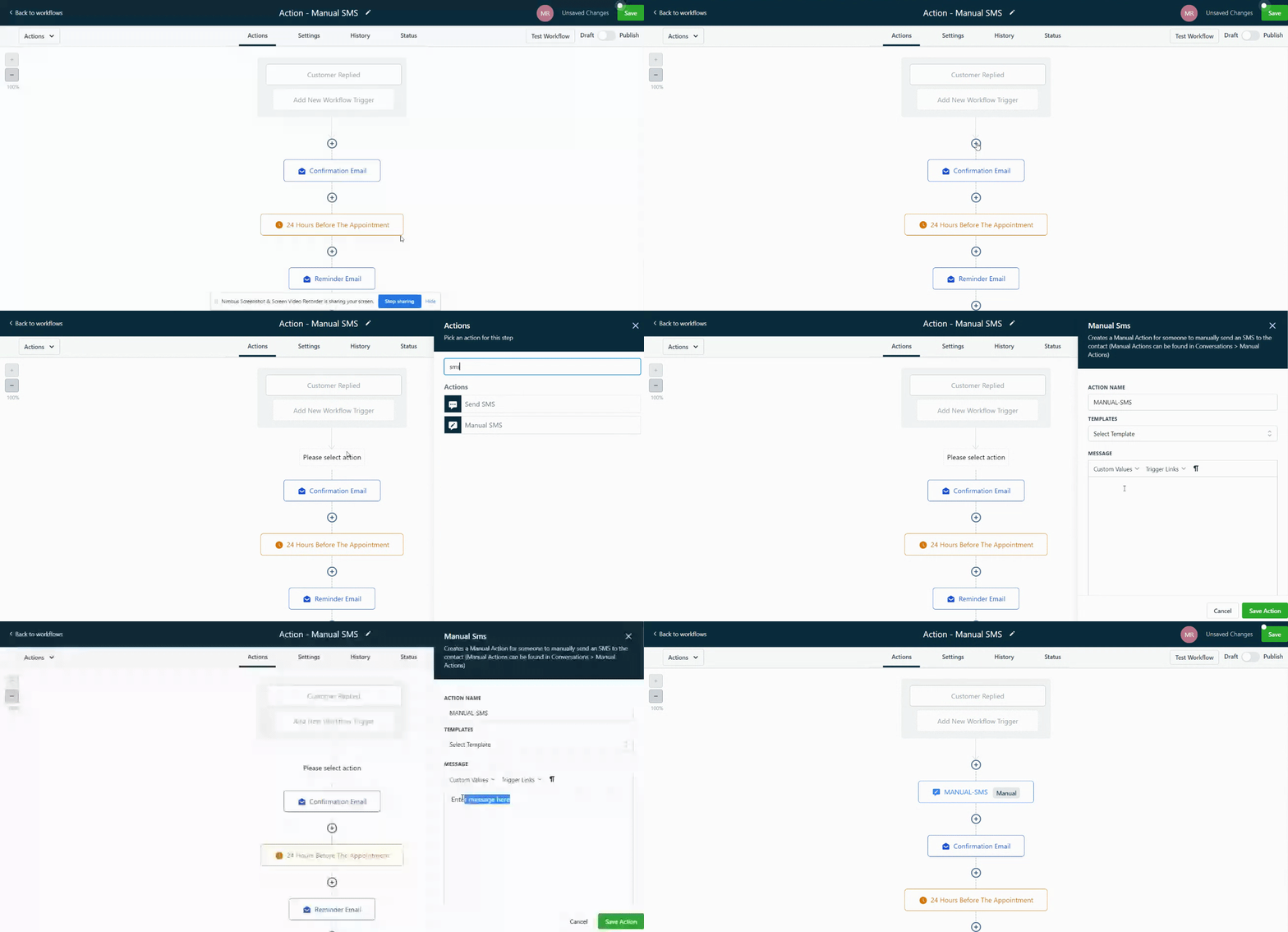
Journey 1: The "5-Minute Wow Factor" (The Hot Lead Journey)
In the home service game, speed is the ultimate differentiator. The prospect who submits a web form is at their moment of peak intent. Your goal is to meet that intent with immediate, professional engagement.
The Psychology
When a lead receives a personalized text message within seconds of hitting "submit," it shatters their expectation of being ignored or having to wait 24 hours. It communicates that your company is on the ball, technologically savvy, and values their time. This single interaction can put you ahead of three other competitors before you've even spoken.
The Automation Blueprint
- Trigger:
Form Submitted(Select your specific contact form). - Action 1: Create/Update Opportunity. Place the lead in the
New Leadstage of yourSales Pipeline. Assign a lead value if applicable. - Action 2: Add Tag. Apply the tag
Hot Lead - Websiteto the contact for future tracking. - Action 3: Send SMS to Contact.
"Hi [Contact Name]! This is [Your Name] from [Your Company]. Thanks for your request regarding [the service they selected on the form, if available]. I'm reviewing it now and will personally call you from this number in the next 5-10 minutes. In the meantime, you can see some of our recent projects here: [Link to your portfolio or gallery]."
- Action 4: Internal Notification. Send an SMS or push notification to yourself or your sales team.
"🚨 HOT LEAD ALERT 🚨 [Contact Name] just requested an estimate for [Service]. Phone: [Contact Phone]. Email: [Contact Email]. CALL THEM NOW!"
Pro Tip: Personalize the instant SMS with the name of the service the lead selected on the form (e.g., "...thanks for your request regarding Roof Repair..."). This shows you're paying attention to the details from the very first second.
The Goal
To make a stunning first impression that demonstrates speed and professionalism, effectively securing the first conversation and framing your company as the premier choice.
Journey 2: The "Expert Advisor" (The Nurturing Journey)
What happens to the lead who goes cold? The one who doesn't answer your initial call or respond to your first email? The amateur gives up. The professional deploys a nurturing sequence.
The Psychology
Most follow-up is annoying because it's purely self-serving ("Just checking in!"). This journey repositions you from a salesperson to a helpful expert. By offering valuable, relevant advice with no immediate ask, you build trust and stay top-of-mind, so when they are ready to re-engage, you're the only one they'll think of.
The Automation Blueprint
- Trigger:
Opportunity Stalled(Define the trigger as 3 days in theContact Attemptedstage). - Action 1: Send Email #1.
Subject: A helpful guide for your [Service] project, [Contact Name]
Body: "Hi [Contact Name], I know you're busy, but I wanted to share a quick resource that many of our clients find helpful: 'The 3 Biggest Mistakes to Avoid When Hiring a Roofing Contractor.' You can read it on our blog here: [Link]. No need to reply, just thought it might be useful for your research. Best, [Your Name]." - Action 2: Wait 4 Days.
- Action 3: Send SMS.
"Hi [Contact Name], it's [Your Name] from [Your Company]. I drove by a project we just finished on Elm Street and thought of you. The photos came out great if you'd like to see the quality of our work: [Link to project photos]. Let me know if you have any questions about your own project."
- Action 4: Wait 5 Days.
- Action 5: Send Email #2 (The Breakup Email).
Subject: Closing your file?
Body: "Hi [Contact Name], I've tried to connect a few times regarding your interest in [Service] but haven't heard back. I assume you've either gone in another direction or your priorities have shifted. If that's the case, no problem at all! I'll go ahead and close your inquiry for now. If you still need help, just reply to this email and I'd be happy to reopen it. All the best, [Your Name]."
The Goal
To re-engage cold leads by providing value, building authority, and creating a polite sense of urgency without being pushy. This journey will salvage leads you would have otherwise considered lost.
Journey 3: The "Post-Estimate Follow-Up" (The Deal Closer Journey)
Sending the estimate is not the end of the sales process; it's the beginning of the decision-making process for the client. This is where most contractors fail. They send the price and pray. This journey automates the crucial follow-up that gets contracts signed.
The Psychology
After receiving a quote, clients often have questions, hesitations, or are comparing you to competitors. Silence is your enemy. This journey proactively addresses their potential concerns, reinforces your value, and makes it easy for them to say "yes."
The Automation Blueprint
- Trigger: Opportunity moved to
'Estimate Sent'stage. - Action 1: Wait 24 Hours. (Give them time to review it).
- Action 2: Send Email #1.
Subject: Any questions about the estimate for [Project Address]?
Body: "Hi [Contact Name], I just wanted to confirm you received the estimate we sent over yesterday for your project. Please take your time to review it. Many of our clients have questions about [mention a specific, common point of confusion like 'materials used' or 'timeline']. I've set aside some time tomorrow afternoon to chat if you'd like to walk through it together. You can book a quick 15-minute call directly on my calendar here: [Link to your booking calendar]." - Action 3: Wait 3 Days.
- Action 4: Send SMS with Social Proof.
"Hi [Contact Name], just following up on that estimate. A client we just finished a similar project for left us this review: '[Insert a short, powerful testimonial]'. We'd love to provide that same 5-star experience for you. Let me know what you think! -[Your Name]"
- Action 5: Wait 3 Days.
- Action 6: Send Email #2 (Value Add / Scarcity).
Subject: Our summer schedule is booking up
Body: "Hi [Contact Name], I hope you're having a great week. I wanted to give you a quick heads-up that our project schedule for the next 6-8 weeks is filling up faster than usual. If you're hoping to get your [Service] project completed this season, I'd recommend we finalize things in the next few days to secure your spot. What's the best way to move forward?"
Pro Tip: In your follow-up email, mention a specific detail you discussed during the site visit. For example: "...I was thinking about the best way to work around that old oak tree you mentioned...". This level of personalization shows you were actively listening to the client's concerns.
The Goal
To close more deals by proactively guiding the client through their decision-making process, overcoming friction, providing social proof, and introducing gentle urgency.
Journey 4: The "Raving Fan" (The Loyalty & Referral Journey)
Your happiest customer is your most underutilized marketing asset. This journey turns a completed job into a glowing review, a future repeat customer, and a source of high-quality referrals.
The Psychology
The moment a project is beautifully completed is the moment of maximum client happiness. This is your window of opportunity. This journey leverages that moment to secure a review, then continues to provide value long-term to ensure you are the only company they call for future needs.
Case Study: How 'DFW Premier Roofing' Increased Their Closing Rate by 30%
Before partnering with CoHorizon, DFW Premier Roofing struggled with inconsistent follow-up on sent proposals. By implementing an automated 'Post-Estimate Follow-Up Journey,' they ensured every potential client received timely, value-driven communication. Within 3 months, their proposal closing rate jumped from 45% to nearly 60%, adding an estimated $250,000 in revenue.
The Automation Blueprint
- Trigger: Opportunity moved to
'Job Completed / Paid'stage. - Action 1: Wait 24 Hours.
- Action 2: Send Email - Final Thank You.
Subject: Thank you for choosing [Your Company]!
Body: "Hi [Contact Name], on behalf of our entire team, I wanted to extend a sincere thank you for trusting us with your home. It was a pleasure working on your [Service] project. We've attached the final paid invoice for your records. If you need anything at all, please don't hesitate to reach out. Thank you again!" - Action 3: Wait 5 Days.
- Action 4: Send SMS - The Review Ask.
"Hi [Contact Name]! It's [Your Name] from [Your Company]. I hope you're loving the completed work! When you have a moment, would you be willing to share your experience on Google? It makes a huge difference for our small business. Here's the link: [Your Google Review Link]. Thank you so much!"
- Action 5: Add to List. Add the contact to your
Past Client Newsletterlist. - Action 6: Wait 6 Months.
- Action 7: Send Email - Seasonal Reminder.
Subject: Is your [related system] ready for the [upcoming season]?
Body: "Hi [Contact Name], can you believe it's been six months since we completed your [Service]? We hope everything is still perfect! With [Winter/Summer] just around the corner, now is the perfect time to think about [related maintenance service, e.g., 'gutter cleaning' or 'AC tune-up']. As a valued past client, we'd like to offer you a 15% discount on that service. Would you like to get that scheduled?"
The Goal
To maximize Customer Lifetime Value (CLV) by systematically generating 5-star reviews, creating opportunities for repeat business, and nurturing a long-term relationship that leads to valuable referrals.
Conclusion: Automation with a Human Touch - The CoHorizon Way
Looking back at these intricate journeys, one truth becomes clear: this level of sophisticated, personalized follow-up is physically impossible to execute manually at scale. Automation isn't about removing the human touch; it's about guaranteeing it. It's about using technology to ensure that your expertise, your brand promise, and your commitment to service are delivered flawlessly, every single time, to every single person.
It's the system that ensures no lead is forgotten. It's the engine that turns happy clients into powerful marketing assets. It's the framework that allows you to transition from being a technician trapped in your business to an owner who is working on their business. This is how you build a predictable, profitable, and ultimately sellable asset.
Setting up software is easy. The internet is full of tutorials on how to click buttons in GoHighLevel. But that is the work of a technician.
Designing intelligent Relationship Journeys that reflect your brand's unique voice, anticipate your clients' needs, and drive real, measurable business results requires a true partner. It requires an architect. At CoHorizon, we don't just implement tools; we build growth systems. We take the time to understand your business, your clients, and your goals, and then we translate that strategy into the powerful, automated journeys that will become the backbone of your company's growth.
Frequently Asked Questions
What is a CRM for home services?
A CRM for home services centralizes client communication, tracks projects, and provides a visual sales pipeline. It helps contractors manage leads efficiently. Platforms like GoHighLevel are all-in-one solutions for this industry.
Why is GoHighLevel good for contractors?
GoHighLevel is ideal for contractors because it combines a CRM, email marketing, SMS automation, booking calendars, and review management into one platform. This simplifies operations and allows for powerful automated "Relationship Journeys".
What is a 'Relationship Journey'?
A 'Relationship Journey' is an automated sequence of communications to guide a lead through their experience with your company, creating a consistent, high-touch experience that happens automatically.